Visible Light, IR Radiation
& Your Thermal Camera:
The Ultimate Middleman!
How a thermal camera translates what the human eye can't see, into visible light that it can see.
Visible Light & IR Radiation
In this blog we explain how a thermal camera translates what the human eye can't see, into visible light that it can see.
To start, both visible light and infrared (IR) radiation are specific frequencies along the electromagnetic spectrum. They differ in wavelength and frequency. IR radiation has lower frequencies and longer wavelengths than visible light. Both travel at the speed of light.
Our eyes, and thermal cameras, are both sensors. Our eyes are sensors that "see" visible light. Our thermal camera is a sensor that "sees" IR radiation.
The Energy Source
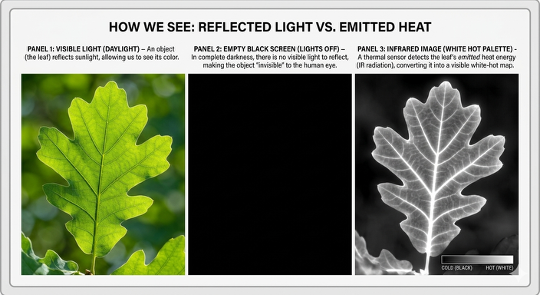
What is different is the energy source. With visible light, the energy or light source is the sun or artificial light (a lightbulb). It reflects off an object so we can see it.
With IR radiation, the object itself is the energy source. The object emits energy in the form of IR radiation.
Colour Bands & Reflection
Visible light has 7 colour bands. The way we "see" an object is that white light hits an object, absorbs some of the bands and reflects the rest. We see the bands that are reflected.
Take a green leaf for example. White light hits the leaf; the leaf absorbs all the colour bands except green. It reflects green and what we see is a green leaf. A white car reflects almost all the colour bands. A black car absorbs almost all the colour bands but reflects just enough light that you see a black object.
In a controlled environment, like your office, you can have any object on your desk, and you can see it. Turn off the lights and you don't see anything. Turn on your thermal camera and now you "see" the object. It is "glowing" with its own energy.
How Does the Thermal Camera Do It?
So, how does the thermal camera turn what we can't see (IR radiation) into something we can see (visible light)?
It is a 3-step process:
-
1
The Capture (Heat to Electricity)
The invisible IR radiation hits the camera's sensor. The sensor captures IR radiation, not colour. That radiation turns into heat when it hits the sensor. Each pixel on the sensor grid acts as a high-speed thermometer. When the IR energy hits it, the pixel warms up, and its electrical resistance changes. -
2
The Conversion (Electricity to Data)
The camera's processor reads these electrical changes. It does not see colours. It sees a massive spreadsheet of numbers representing temperature values for each pixel in the frame. The colours it shows are actually the software "painting" colours for the different data points. The software creates these palettes. (Palettes will be a separate topic in our next blog.) -
3
The Re-Mapping (Data to Visible Image)
THIS IS YOUR MIDDLEMAN! It translates what IT can see into something WE can see. The software is programmed to match a colour value to each pixel depending on the temperature value and the pallet. A pixel in a "white hot" palette that has a "hot" value is "told" to colour it bright white on the screen. A "cold" value is told to colour it black.
The Result
Your screen is now glowing with visible light. But the colour is a "false colour" representation of the invisible heat numbers the sensor collected and turned into the colour the software told it to.
So, you aren't seeing the IR radiation itself. You are seeing a "visual map" of the IR radiation data the camera has drawn for you.
Questions?
Questions? Just send me a note.
Palettes – What they are, what they mean, and why are they different?
This article is for educational purposes only. Infrared thermography results should always be reviewed by a qualified thermographer. Secondary verification is typically required to confirm the cause of any thermal anomalies identified.